How to Build a video editor portfolio that attracts clients
Let's be blunt: a killer video editor portfolio is the single most important asset you have. It's what gets you hired, not your resume. It’s the visual proof that you can tell a compelling story, showcasing your skills, style, and unique creative voice to any potential client or employer.
Why Your Portfolio Is Your Strongest Sales Tool
Honestly, think about it from my perspective—and yours. Your resume might list skills like "Proficient in Adobe Premiere Pro" or "Experienced in color grading," but those are just words on a page. They don’t capture the rhythm of your edits or your knack for creating emotional impact. Your portfolio does.
It’s the difference between telling someone you’re a great chef and actually serving them an incredible meal.
I've personally seen talented editors with so-so resumes land six-figure contracts because their portfolio was just undeniable. It told a story not only within the videos but about the editor themselves—their vision, their technical mastery—in a way no bullet point ever could.
Moving Beyond a Simple Gallery
The biggest mental shift you need to make is to stop seeing your portfolio as a simple gallery of past work. It's not. It's your primary sales and marketing engine.
Every single project you include should be a strategic choice, designed to attract a specific type of client or job. You're curating an experience that answers a potential client's most important question: "Can this person solve my problem and deliver results?"
A well-crafted video editor portfolio does a few key things:
- It builds immediate trust by giving them tangible proof of what you can do.
- It communicates your unique style, setting you apart from a sea of other editors.
- It justifies your rates by showing the high-quality work you deliver.
- It acts as a silent salesperson, working for you 24/7 to bring in leads.
This is the very essence of what a portfolio website is and why it matters—it’s not just a collection, it's a strategic career tool.
Your resume might get your foot in the door, but your portfolio is what gets you a seat at the table. It turns your skills from a claim into a powerful demonstration.
The Modern Hiring Landscape
The demand for skilled video editors isn't slowing down. In fact, there are over 32,533 video editors currently employed in the United States alone, and that number keeps climbing.
Here’s the kicker: a massive 71% of them work for private companies where a portfolio isn't just a nice-to-have; it's a non-negotiable requirement just to be considered. You can learn more about how these video editing industry statistics are shaping hiring practices today.
In such a competitive market, a generic or outdated portfolio is a dead end. The editors landing the best gigs are the ones whose portfolios are meticulously curated, strategically designed, and speak directly to their target clients. It is, without a doubt, your most powerful tool for career growth.
Defining Your Niche and Curating Your Best Work
One of the biggest mistakes I see talented editors make is building a "generalist" portfolio. It's a classic trap: you try to show you can do everything—from corporate videos and wedding films to flashy social media ads.
What's the result? A portfolio that tries to appeal to everyone and, in the end, impresses no one. It screams "jack-of-all-trades, master of none," and that's a surefire way to get lost in the noise.
This is where you need to get strategic. Specializing isn't about limiting your opportunities; it's about attracting the right ones. Think about it: if a client needs a high-energy, fast-paced commercial for their new energy drink, are they going to hire the editor with a reel full of slow, cinematic documentaries, or the one whose work screams excitement and impact?
Clients hire experts who solve their specific problems. Your portfolio is your chance to prove you are that expert.
Find Your Unique Strength
Before you even think about which projects to show off, you need to look inward. What kind of work truly energizes you? What are you genuinely best at? This isn't just about the software you know, but about your unique creative voice.
Ask yourself these questions:
- What projects did I enjoy the most? Think about the work that made you lose track of time. Was it the intricate storytelling of a short film or the satisfying rhythm of a music video?
- Where have I delivered the best results? Look back at projects that made clients say "wow." What was it about that work that stood out?
- What industry or style aligns with my passion? Are you obsessed with the slick, polished look of tech product videos, or the raw, authentic feel of non-profit documentaries?
Your answers will point you toward your niche—that sweet spot where your passion, skills, and market demand all line up. Focusing here lets you build a powerful, targeted video editor portfolio that speaks directly to your ideal client.
Quality Over Quantity Always Wins
Once you’ve locked in your niche, it’s time to be ruthless with your project selection. A portfolio with three outstanding, relevant projects is infinitely more powerful than one with ten mediocre or unrelated ones. Each piece has to earn its spot.
Your portfolio should be a highlight reel, not an archive. Every video you include should be a clear and compelling reason for someone to hire you for a specific type of work.
When deciding what to include, don't just pick the projects that look cool. Select the ones that demonstrate tangible business value. A video that looks amazing is great, but a video that increased a client’s sales by 20% or doubled their social media engagement is a powerful case study.
This simple shift changes the entire conversation from your technical skills to the concrete results you deliver. For a deeper dive, exploring a variety of portfolio work examples can provide some great inspiration on how to frame your projects to showcase impact.
Choosing Your Best Portfolio Pieces
To make this process less emotional and more objective, I use a simple framework to evaluate each potential project. This helps me avoid getting attached to a project that, while fun to work on, doesn't actually serve my current career goals.
Here’s a look at how you can assess your own work with that same critical eye.
| Project Type | What It Demonstrates | Ideal Client Target | Should You Include It? |
|---|---|---|---|
| Corporate Brand Story | Ability to handle interviews, craft a narrative, and align with brand messaging. | Marketing managers at mid-to-large sized companies. | Yes, if targeting corporate clients. Shows professionalism and storytelling. |
| Fast-Paced Social Ad | Skill with motion graphics, quick cuts, sound design, and vertical formats. | E-commerce brands, digital marketing agencies. | Yes, if you want social media or ad work. Proves you understand modern pacing. |
| Passion Project (Short Film) | Raw creativity, storytelling ambition, and technical craft without client limits. | Creative directors, production companies. | Maybe. Use it to show your unique style, but ensure the quality is exceptional. |
| Old Client Work (Dated Style) | Your skills from three years ago. | No one you want to work with today. | No. Outdated work suggests your current skills are also outdated. Be ruthless. |
By using a structured approach like this, you curate a collection of work that isn't just visually impressive but is strategically engineered to attract the clients you want. This is how you stop being just another editor and become a specialized creative partner they can’t afford to pass up.
Choosing the Right Platform for Your Portfolio
Where you decide to build your video editor portfolio is almost as important as the work itself. Think of it as the digital stage for your work—it’s a core branding decision that tells potential clients a lot about your professionalism, your creative eye, and even the rates you command. The right one makes all the difference.
When I first started out, I made a classic rookie mistake: I jumped onto a free, template-based platform because it was fast and easy. Sure, it got my work online, but it also made me look just like every other editor using that same template. I realized pretty quickly that to attract the kind of clients I really wanted, I needed a platform that gave me more control and actually reflected the quality of my editing.
Dedicated Platforms vs. Website Builders
The world of portfolio platforms really breaks down into two main camps: dedicated video hosting and social portfolio sites, and all-in-one website builders. Each has its own set of pros and cons, and the best choice for you depends entirely on your goals, budget, and how comfortable you are with the tech side of things.
Dedicated Platforms (like Vimeo or Behance)
- The Good: These platforms are built from the ground up for creatives. You get excellent video playback quality (Vimeo is the undisputed king here), a built-in community of artists and potential clients, and they're generally a breeze to set up.
- The Not-So-Good: Customization is where they fall short. Your portfolio is stuck inside their branded ecosystem, which really limits your ability to build a unique brand identity. You’re basically renting space, not owning your digital home.
Website Builders (like Squarespace, Webflow, or WordPress)
- The Good: This is where you get total control. You can design a completely custom user experience from the ground up, integrate your own branding seamlessly, and map out the entire client journey, from the moment they land on your site to when they hit "send" on your contact form. This is your own corner of the internet.
- The Not-So-Good: With great power comes a steeper learning curve and, often, a higher cost. You're on the hook for everything—design, domain, hosting—which can feel a bit overwhelming if you're not technically inclined.
A dedicated platform like Vimeo is an excellent place to host your high-res video files, but a custom website is the best place to present your business. The pros often use both in tandem to get the best of both worlds.
Making the Right Choice for Your Career
So, how do you decide? It really boils down to where you are in your journey and what you want to achieve.
If you're just starting and need to get your work online quickly and without spending much, a platform like Behance can be a fantastic starting point. The built-in community alone can provide some valuable early exposure.
But if you're serious about establishing yourself as a premium freelancer or a go-to boutique editing service, investing in your own website isn't just a good idea—it's non-negotiable. I can tell you from experience that my career took a noticeable turn for the better the day I launched my first custom site. Clients started seeing me as a business owner, not just a gig worker, and the project inquiries I received started to reflect that. I even had one client tell me my site's professional design was what convinced them to reach out, because it signaled a high level of attention to detail—exactly what they were looking for in an editor.
This infographic does a great job of simplifying the thought process behind what to showcase, which is a crucial first step before you even think about picking a platform.
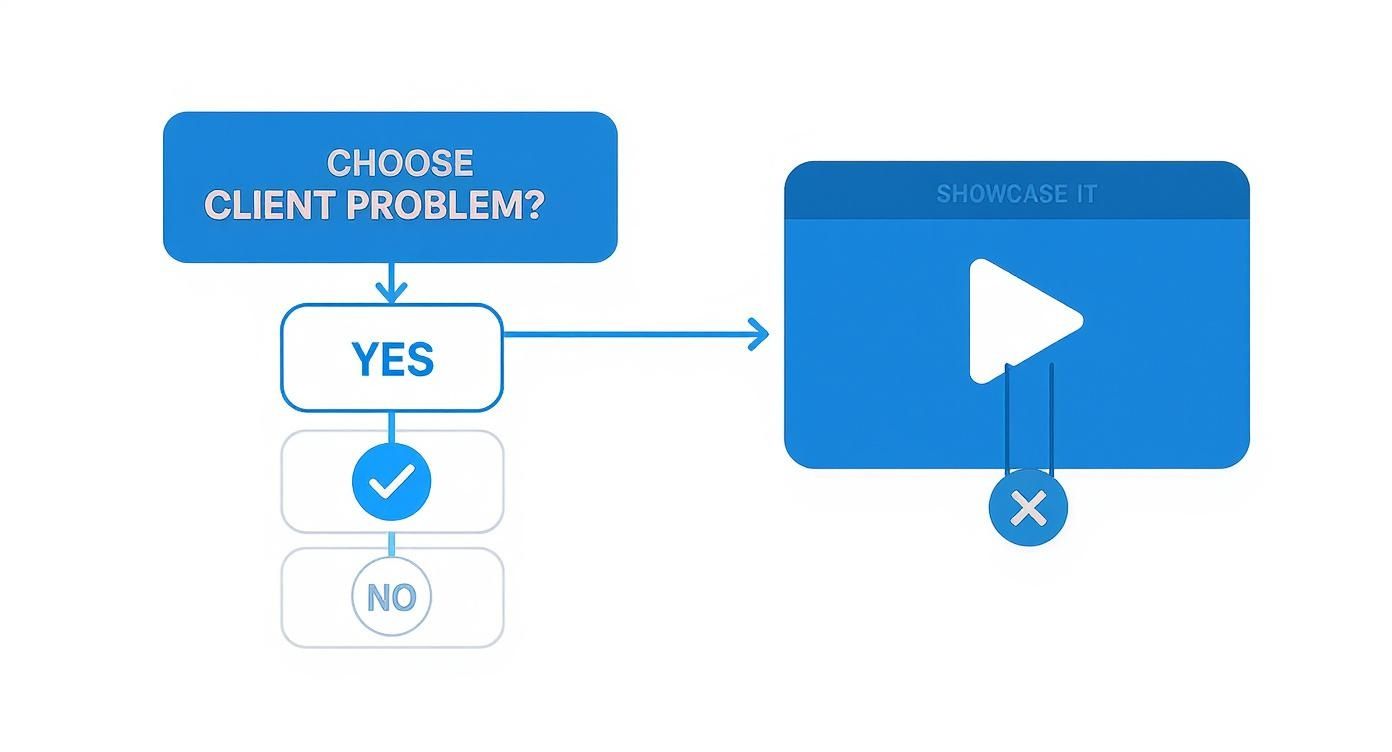
The decision tree here really drives home a core principle: every single piece in your portfolio should be a direct answer to a potential client's problem.
Ultimately, a custom website built on a platform like Squarespace or Webflow gives you the power to tell your complete brand story. You can create dedicated pages for your services, write a blog to share your expertise, and build out compelling case studies for each project. For those on a tight budget, don't worry—there are still great options. It's worth exploring this guide on the best free portfolio website builders, which gives a solid overview of platforms that let you build a professional presence without the financial commitment. This kind of control is what turns your portfolio from a simple gallery into a powerful sales tool.
Designing a User Experience That Converts Clients
A killer video editor portfolio is way more than just a grid of your best clips. Think of it as a guided tour. You're leading a potential client on a journey from the second they land on your site, and the destination isn't just to impress them—it's to get them to hire you.
I’ve seen it time and time again: great user experience (UX) is what separates a portfolio that gets a nice comment from one that gets a contract. It’s all about making it dead simple for a busy producer or creative director to find what they need, see your value, and know exactly what to do next. If they get confused or have to wait for something to load, they're gone.
Over the years, I've boiled this down to a non-negotiable checklist for any portfolio homepage I touch. It’s a simple framework that gets the most important stuff front and center, grabbing a visitor's attention in those crucial first five seconds.
My Personal Homepage Checklist
- A Powerful Headline: Don't just say "Video Editor." Tell them what you do. Something like, "Crafting Compelling Brand Stories Through Cinematic Video Editing," instantly communicates your niche and your value.
- Your Best Work Above the Fold: Your demo reel or your absolute best project needs to be right there when the page loads. No scrolling required. Don't make them hunt for the goods.
- A Crystal-Clear Call-to-Action (CTA): What’s the next step? Make it obvious. A big, bold button that says "Book a Call," "View My Work," or "Get a Quote" should be impossible to miss.
- Simple, Intuitive Navigation: One click. That’s all it should take to get to your work, your about page, or your contact info. Keep the menu clean and straightforward.
This setup creates a powerful first impression. It shows you're a pro and makes it incredibly easy for a potential client to take the next step. If you want to dive deeper, we break down these concepts in our complete guide to portfolio website design.
The Psychology of a Smart Layout
How you arrange things on a page is more than just aesthetics; it's about telling people where to look. This is called visual hierarchy, and you control it with size, color, and placement to guide a visitor's eyes exactly where you want them to go.
Your main headline, for instance, should be the biggest text on the page. Your main call-to-action button should have a color that pops against the background. This isn't just pretty design; it's a strategic way to control the user's journey.
Speed is the other huge factor. A slow website is a client repellent. I’ve seen data that shows a delay of just one second can cause a massive drop in conversions. That stunning 4K showreel is useless if it takes 30 seconds to buffer. Optimize your video files for the web and make sure you're using solid hosting.
A great portfolio design isn’t about adding more stuff; it's about removing friction. The easier you make it for clients to see your value, the more likely they are to hire you.
Writing Project Descriptions That Sell
The final piece of this puzzle is context. Just showing a video isn't enough. You have to frame each project with a short, compelling story. This is your chance to show the why behind your work.
Think of your project descriptions as mini-case studies. They need to answer three quick questions:
- The Challenge: What was the client trying to achieve? (e.g., "A new startup needed a punchy demo video to hook investors.")
- Your Solution: What did you do? (e.g., "I developed a script that focused on user benefits and used dynamic motion graphics to highlight the app's key features.")
- The Results: What happened? (e.g., "The video was a key asset in their pitch deck, helping them successfully raise $1.5 million in seed funding.")
This approach completely changes the game. It positions you not just as a technician who can cut clips together, but as a strategic partner who delivers real, measurable results. And that’s exactly what high-value clients are paying for.
Showcasing Advanced Skills to Future-Proof Your Work
Having a solid portfolio is a great start, but in a market this crowded, "solid" just doesn't cut it anymore. If you want to stand out and start commanding higher rates, you have to prove you're operating at the top of your game. This is your chance to showcase the skills that separate the everyday editor from the truly indispensable ones.
I'm talking about the high-level skills clients are desperate for but often don't even know how to ask for—things like complex color grading, immersive sound design, and slick motion graphics. These aren’t just flashy add-ons; they're the layers of professional polish that take a project from "good enough" to "unforgettable." Your video editor portfolio needs to be the undeniable proof that you've mastered them.
Beyond the Basic Cut
Anyone can show they can assemble clips on a timeline. What’s much harder to demonstrate is a deep, intuitive understanding of mood, pacing, and tone. This is where you can pull back the curtain and reveal your technical artistry.
Instead of just showing the finished product, think about creating short "breakdown" videos. From my experience, these are absolute gold because they give clients a rare peek into your creative decision-making.
- Color Grading Showcases: Use a simple "before and after" slider. Briefly explain how your color choices served the story's emotional core—turning a flat, neutral shot into one that feels warm and nostalgic, or maybe cold and tense.
- Sound Design Spotlights: Isolate the audio from a key scene. Play it once with only the dialogue track, then slowly layer in your foley, ambient sounds, and score to show how you built a rich, immersive world from scratch.
- Motion Graphics Breakdowns: Show the static graphic elements first, then reveal the final, fully animated sequence. This is a powerful way to highlight your ability to bring titles, data visualizations, and lower thirds to life—a skill that’s massively in demand for corporate and marketing gigs.
These mini case studies do more than just show what you did; they show how you think. It immediately positions you as a creative partner, not just a pair of hands for hire.
Embracing the AI Revolution
Let's talk about the elephant in the room: artificial intelligence. Trying to ignore it is no longer an option. The video editing software market is changing fast, with the AI software segment alone accounting for 70.5% of the market in 2023. Showing you're comfortable with these tools has quickly gone from a nice bonus to a core expectation.
This doesn't mean you're letting a machine do your job. It means you're showing clients you can work smarter, faster, and more efficiently.
Highlighting proficiency with the latest advancements, such as the top AI video editing tools, demonstrates a forward-thinking approach that future-proofs your work. You're showing clients you can deliver high-quality results with modern efficiency.
In your project descriptions, you can casually mention how you used an AI-powered tool for a tedious task like generating transcripts or finding the best takes. Explain how that freed you up to spend more time on the creative edit—the part that really matters. This shows you're not just chasing trends; you're using them strategically to deliver a better final product.
Ultimately, demonstrating these advanced skills is directly tied to your bottom line. By proving you have a deeper, more technical skill set, you’re making a bulletproof case for why you're worth a higher rate than the editor who only offers the basics. It's a fundamental part of learning how to build a personal brand that clients will see as a premium investment, not just another expense.
Got Questions About Your Portfolio? Let's Clear Things Up.
Building a powerful video editor portfolio brings up a ton of questions, and everyone seems to have a different opinion. I've been there. Over the years, I've heard the same worries from editors just starting out and from seasoned pros looking to sharpen their edge. Let’s cut through the noise and get you some straight answers.
How Many Videos Should I Actually Show?
This is the classic "quality over quantity" debate, and let me be clear: quality wins. Every. Single. Time.
Aim to showcase your 3 to 5 absolute best projects. A portfolio with three jaw-dropping, diverse pieces will always outperform one with ten so-so videos.
Each project you feature needs to have a purpose. Maybe one shows off your cinematic storytelling, another highlights your lightning-fast commercial cutting, and a third flexes your motion graphics skills. This focused approach screams expertise and confidence.
Now, if you work in multiple niches—say, corporate videos and music videos—it’s fine to have a larger library of maybe 8-10 projects ready to go. You can then pull from that collection to create a custom reel or a private link for a specific job application. But for your main, public-facing portfolio? Keep it lean, mean, and unforgettable.
What if I Have No Professional Work to Show Yet?
Every single editor starts in this exact spot, so don't sweat it. If you don't have client work, you've got something just as valuable: a blank slate to create projects that show off your pure passion and raw talent, with zero outside constraints.
This is your moment to get creative and prove what you can do on your own terms.
- Re-edit a Movie Trailer: Grab a film you love and cut a new trailer with your own unique style. It’s a brilliant way to demonstrate your grasp of pacing, tone, and narrative.
- Create a Spec Commercial: Pick a brand you admire and make a commercial for one of their products. This proves you can think commercially and capture a brand's voice.
- Shoot a Passion Project: Got an idea for a mini-documentary about a local artist? A short film? A travel video? Go make it. This shows initiative and a genuine love for the craft.
A single, well-executed spec project is infinitely more impressive than an empty portfolio. It tells potential clients you're driven, creative, and always honing your skills.
Do I Really Need a Demo Reel AND a Website?
Yes, you need both. They serve two different, equally critical functions. Think of it like this: your demo reel is your killer elevator pitch, and your website is the full, in-depth presentation.
A busy creative director or producer might only give you 60 seconds of their attention at first. Your reel needs to be a high-energy, fast-paced highlight of your absolute best shots. Its only job is to grab them by the collar and make them think, "Okay, I need to see more from this person."
Once they're hooked, they'll click through to your portfolio website. That's where they can watch the full projects and see your work in context. They want to understand the story, see how you handled a complete narrative, and maybe even read a quick case study about the project.
Your reel gets you in the door. Your full portfolio on a dedicated website is what closes the deal. Make sure to embed that reel front and center on your homepage—it should be the very first thing a visitor sees.
How Often Should I Update My Portfolio?
Your portfolio is a living, breathing showcase of your talent, not a dusty archive of past wins. A good rule of thumb is to give it a hard look every 3 to 6 months. As you complete bigger and better projects, some of your older work will naturally start to feel a bit dated.
Be ruthless. Cut the weaker pieces and swap in your latest and greatest work. If you've just nailed down a new skill like advanced color grading or 3D animation, your portfolio needs to reflect that. It’s also crucial that your portfolio highlights your proficiency with leading video editing software, as this proves you have the core technical chops and are keeping up with industry standards.
An up-to-date portfolio sends a powerful message: you are an active, in-demand professional who is constantly pushing their craft forward. It shows you're not just resting on your laurels—you're getting better every single day.
Ready to build a stunning portfolio website that truly represents your skill and ambition? With Fantastic Portfolios, you can turn your resume into a professional, polished site in just 30 seconds. Our AI-powered platform helps you craft the perfect narrative, showcase your projects beautifully, and attract the clients you deserve. Get started for free and build your site today at https://fantasticportfolios.com.