A Personal Guide to Portfolio Website Design
So, what exactly is portfolio website design? Put simply, it’s the art of creating a dedicated online space to show off your work, your skills, and your professional journey. But it's so much more than just a gallery. From my own experience, I've learned to think of it as a strategic marketing tool built to reel in clients, wow recruiters, and establish my personal brand. A great design doesn't just display your projects; it weaves them into a powerful story about your expertise.
Why Your Portfolio Website Is Your Most Important Asset
I’ve seen it firsthand time and time again—a portfolio website is so much more than a digital lookbook. It's your digital handshake, your 24/7 salesperson, and your professional story, all rolled into one powerful package. In my own career, I've watched a well-designed portfolio open doors that a traditional résumé just couldn't budge.
This single asset is now essential for just about everyone. It doesn't matter if you're a freelance creative hunting for your next gig or an established agency trying to land bigger contracts. The data backs this up, too. First impressions of a website are 94% design-related. That means the look and feel of your portfolio directly shape your credibility from the very first second someone lands on your page.
The Evolution of the Professional Portfolio
Portfolios have come a long, long way. They've morphed from simple, static galleries into sophisticated business tools that actively drive growth and build trust with potential clients. What was once a niche requirement for artists and photographers is now the standard for professionals across dozens of fields.
A portfolio is no longer just a collection of work samples. It is a strategic tool that demonstrates your problem-solving abilities, communicates your value, and proves your expertise in a tangible way.
This is a massive shift. Today, you’ll find portfolios being used in industries like construction, landscaping, and even consulting to showcase project outcomes and boost their credibility. These sites are often built with smart features like project filters and are optimized for search engines to pull in the right kind of traffic. If you're looking to go deeper on this, our guide on creating an effective online portfolio has some great insights.
This trend makes it crystal clear just how vital a well-executed portfolio is for proving your worth in today's market. Before we jump into the "how" of building one, it’s critical to understand the "why"—so you can invest your time and effort into this foundational asset with confidence.
First Things First: Define Your Purpose Before You Design Anything
Jumping straight into picking a template is a rookie mistake I see all the time. Before you even think about colors, fonts, or layouts, we need to get crystal clear on your "why."
What is the single most important thing you want a visitor to do after seeing your work?
Your goal is the bedrock of your entire portfolio website design. Are you trying to land a full-time gig at a top agency? Attract high-paying freelance clients? Or maybe you want to sell digital products directly from your site? Each of these goals demands a completely different design approach and user journey.
Who Are You Trying to Impress?
Let’s get specific. I always start by creating a simple persona for my ideal visitor. Picture a busy hiring manager at your dream company. They probably have less than a minute to spare and are sifting through dozens of portfolios.
What do they absolutely need to see in the first 10 seconds to be impressed?
- For a Job Seeker: A recruiter needs to find your resume link instantly. They're looking for clear, impactful project titles and a concise "About Me" section that spells out your core skills. No fluff.
- For a Freelancer: A potential client wants to see a massive "Book a Call" button. They're looking for social proof—testimonials from past clients and case studies that prove you deliver results.
- For a Business: If you're a company, it's all about showcasing client successes and tangible outcomes. For a deeper dive on this, check out our detailed guide on building a strong business portfolio.
Thinking this way forces you to be ruthless with your content. You start prioritizing what truly matters to your audience, not just what you think looks cool. This empathy-driven approach is what separates an average portfolio from one that actually gets results.
Your portfolio's success isn't measured by how beautiful it is, but by how effectively it achieves your primary professional goal. It's a tool, not just an art gallery.
By the end of this exercise, you should be able to nail down your portfolio's mission in a single sentence. Something like: "My portfolio's purpose is to convince creative directors at tech startups that I am the best UX designer to lead their next mobile app project."
This mission statement becomes your North Star. Every single design decision—from the homepage layout to the project descriptions—should directly support this goal. With this clarity, you're finally ready to make choices that will truly move the needle.
Choosing the Right Platform to Build Your Portfolio
The platform you pick for your portfolio can either be your greatest asset or your biggest headache. Trust me, I've logged enough hours on enough builders to know that making the right call upfront saves you from a world of frustration down the road. This isn't just about comparing features; it's about matching the tool to your skills and what you're trying to accomplish.
For a lot of creatives, the path of least resistance leads straight to all-in-one website builders like Squarespace or Wix. Their main draw? Simplicity. You can drag and drop your way to a beautiful, professional-looking site in a single weekend, all without writing a single line of code. They take care of the technical stuff—hosting, security, all of it.
This decision tree gives you a good visual on how to match a platform to your goal.
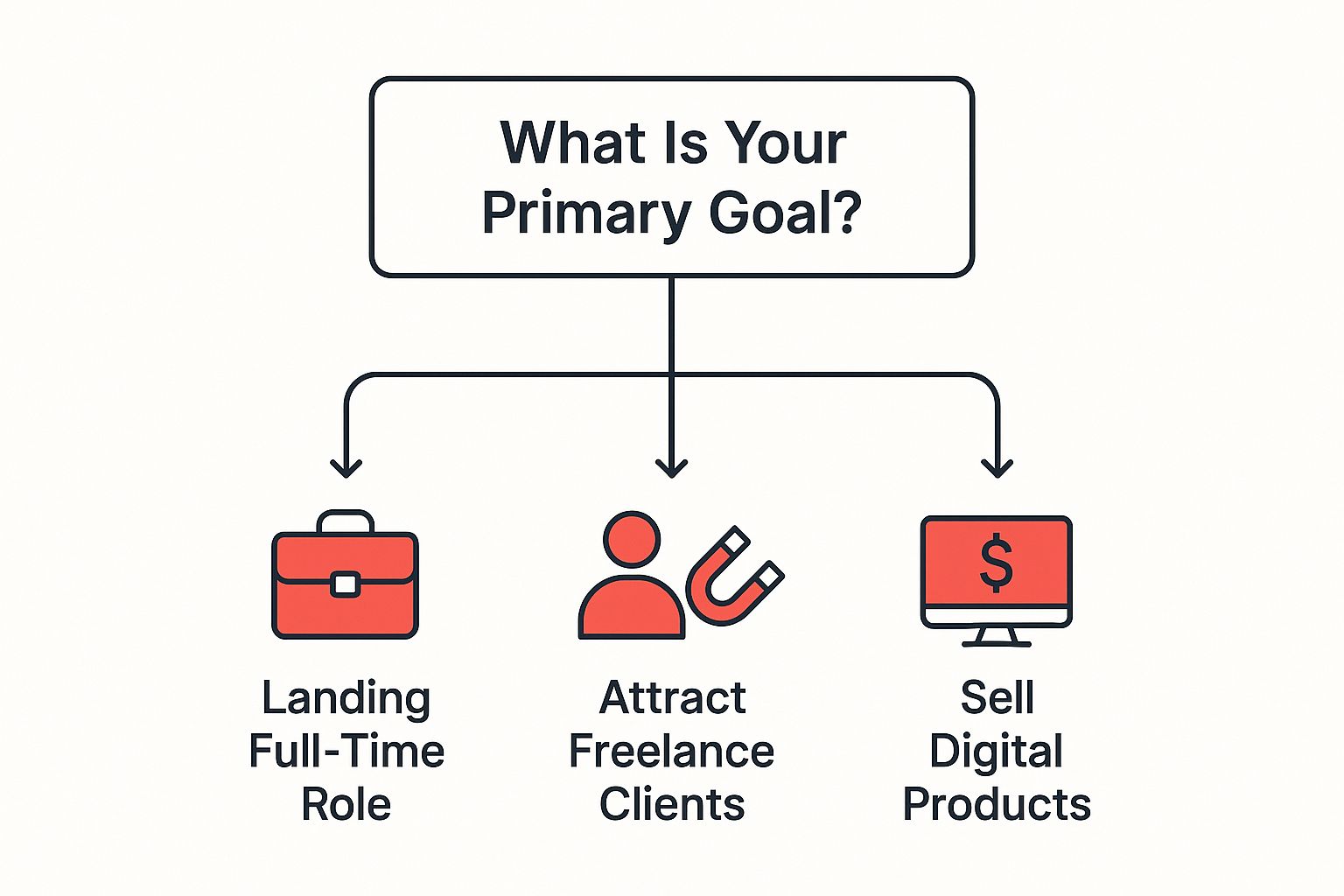
As you can see, what you want to do with your portfolio really dictates the best tool for the job. A site built to reel in freelance clients, for instance, often needs more firepower than one designed just to land a full-time gig.
Website Builders Versus Self-Hosted Solutions
So, what's the catch with those easy-to-use builders? The trade-off for all that convenience is usually a lack of total control and potentially higher costs over the long haul.
If you're someone who wants absolute command over every pixel, a self-hosted WordPress site is the way to go. The creative freedom is practically endless. You've got thousands of themes and plugins to bend the site to your will.
But here's the thing: with great power comes great responsibility. I learned that one the hard way. When you go the WordPress route, you're the one on the hook for security, updates, and fixing things when a rogue plugin inevitably breaks your site. It's a much steeper learning curve, but the reward is a site that is 100% yours, ready to grow and change right along with your career.
To help you weigh your options, here’s a quick breakdown of some of the most popular platforms out there.
Portfolio Platform Comparison
| Platform | Best For | Ease of Use | Customization Level | Estimated Monthly Cost |
|---|---|---|---|---|
| Squarespace | Visual artists, photographers, designers needing a polished look with minimal effort. | Very High | Medium | $16 – $49 |
| Wix | Beginners and creatives who want a drag-and-drop interface with tons of templates. | Very High | High | $17 – $159 |
| WordPress.org | Developers, bloggers, and anyone wanting complete control and scalability. | Low | Very High | $5 – $50+ (Varies with hosting) |
| Adobe Portfolio | Creatives already in the Adobe ecosystem looking for a simple, fast solution. | High | Low | Included with Creative Cloud |
| Behance | Designers and illustrators seeking community feedback and exposure within the Adobe network. | High | Low | Free |
Ultimately, this choice boils down to what you value more: convenience or control. For instance, a graphic designer might just need a beautiful, no-fuss gallery to show off their work, making a builder a perfect match. For a deeper dive, our guide on creating a standout graphic designer portfolio site has some great, specific advice on this.
On the other hand, if you're a developer who wants to show off your technical chops, wrestling with a self-hosted WordPress site can actually be part of your portfolio. It's a playground to prove you know your stuff.
How to Curate and Present Your Best Work
This is where the real magic happens. Your portfolio should be a highlight reel, not a dusty archive of every single project you’ve ever touched. After years of building my own portfolios and guiding clients, I can tell you that the “less is more” philosophy really works. Quality always trumps quantity.
Think about it: recruiters and potential clients are always short on time. I've read studies showing that many spend less than three minutes scanning a portfolio. Your job is to make an immediate, powerful impression. A curated selection of 4-6 of your strongest projects is far more impactful than a cluttered gallery of twenty mediocre ones. The key is to choose pieces that tell a cohesive story about your skills, your style, and the value you bring to the table.
The Art of Selection
Curating your portfolio requires a strategy. It's tempting to pick my personal favorites, but I always get better results by choosing projects that align with the kind of work I want to do next. When you're making those tough choices, some targeted graphic design portfolio tips can really help you zero in on what will resonate with your ideal audience.
Try to showcase a range of skills with your selections:
- A project that shows technical mastery: This is the piece that proves you have a solid command of your tools and core competencies.
- A project that highlights problem-solving: Here's where you demonstrate that you can think strategically to overcome a tough challenge.
- A project that reflects your unique style: Let your personality and creative voice shine through with this one.
- A project that produced measurable results: If you have hard data (e.g., increased conversions by 15%), feature it prominently. This is gold.
This thoughtful approach positions you as a strategic professional who understands that a portfolio is a business tool, not just a collection of pretty pictures.
Crafting Compelling Case Studies
A truly effective portfolio website design doesn't just show the final product; it tells the story behind it. That’s what case studies are for. They transform a simple image into a compelling narrative of success, walking the visitor through your process from start to finish. A well-structured case study is your most powerful sales pitch.
A case study is your opportunity to prove your value. It’s not about what you did; it’s about why you did it and the positive impact it had.
Each project page should guide the reader through a clear, logical story. Start with the problem or the challenge. What was the client's pain point? Next, detail your process. How did you approach the problem? Use visuals like wireframes, sketches, or behind-the-scenes photos to make it all feel more tangible.
Finally, present the solution and—most importantly—the outcome. This is where you can use client testimonials or performance metrics to build instant credibility. A quote from a happy client can be more persuasive than any paragraph you could ever write yourself. This structure turns passive viewers into engaged prospects who understand not just what you do, but how you think.
If you're in a specialized niche, seeing how others do it can be a huge help. Our article on what makes a great product designers portfolio has some excellent real-world examples to get you started.
Mastering the Essentials of Portfolio Aesthetics
Good design isn't just about making things look pretty; it's about clear communication. Your portfolio's aesthetics are the very first thing a visitor notices, and they send an immediate signal about your professionalism. The goal here is to create a visual experience that is both memorable and incredibly easy to get around.
In my experience, the best portfolios let the work do the talking. You never want your site's design to scream louder than your projects. This is exactly why sticking to timeless design principles is a much smarter move than chasing some fleeting trend that will look dated in a year.
Recent data backs this up. One survey found that Timeless, Elegant, Luxury styles were the most popular among designers, with 31.25% favoring this approach. Right behind that were Minimalistic, Simple designs at 26.92%. It’s no surprise—these classic styles provide a clean, sophisticated canvas that lets your work truly shine. You can dig into more of the web design survey results if you're curious.
Building Your Visual Hierarchy
Visual hierarchy is just a fancy way of saying you're intentionally guiding your visitor's eye. You decide what's most important and then use design to draw attention to it. This isn't some abstract theory; it's a practical tool to make sure your key messages actually land.
Think about your homepage. What's the one thing you want someone to see first? Is it the project title? A stunning hero image? A big "Contact Me" button? Your entire visual structure should be built to support that single goal.
Your portfolio cover page is your digital handshake. The visual hierarchy you establish there sets the tone for the entire visitor experience, making it a critical element in your overall portfolio design.
To get this right, focus on a few core elements:
- Size and Scale: Bigger things get noticed first. It's that simple. Make your most important headline significantly larger than your body text.
- Color and Contrast: A brightly colored button on an otherwise neutral background is almost impossible to miss. Use color strategically to highlight your calls to action.
- White Space: Don't underestimate the power of nothing. The empty space around elements is just as important as the elements themselves, preventing a cluttered look and helping the user focus.
The Power of Typography and Color
Your font choices say a lot about your personal brand. A serif font can feel classic and authoritative, while a clean sans-serif often comes across as modern and approachable. Whatever you choose, the number one priority is readability. Pick one or two fonts at most—one for headings, one for body text—and stick with them.
Your color palette should be just as intentional. Limit yourself to two or three primary colors that reflect your personal style. A cohesive palette is what ties the entire portfolio together, giving it that polished, professional look.
If you're feeling stuck, a great way to get inspired is to look at how others have pulled this off. Reviewing some great examples of a portfolio cover page can show you how these principles work in the real world.
Making Sure Your Portfolio Gets Seen
You've poured your heart and soul into creating a beautiful portfolio. The projects are perfect, the design is slick. But all that work is for nothing if clients and recruiters can't find it. This is where we need to get a little technical, but don't worry, I'll break it down into simple, actionable stuff you can do right away.
Think of Search Engine Optimization (SEO) as the digital breadcrumbs that lead people straight to your website. Getting this right is absolutely critical, especially when you consider the global web design market is expected to hit $92.06 billion by 2030. You're competing in a massive field, so every little edge counts.
Getting Found on Google
"On-page SEO" might sound like intimidating marketing jargon, but it's really just about making your site easy for both people and search engines to understand. A few small tweaks can honestly make a huge difference in your portfolio website design’s visibility.
Before any portfolio I build goes live, I always run through this quick personal checklist:
- Keyword-Rich Project Titles: Instead of something generic like "Project 1," get descriptive. Think "UX Redesign for a Fintech Mobile App."
- Descriptive Image Alt-Text: This is a big one. Write clear, simple descriptions for your images, like "Minimalist logo design for a sustainable coffee brand." It helps with accessibility and gets your work found in image searches.
- Clean URL Structure: Keep your URLs short and to the point. Something like
/project/fintech-app-redesignis way better than a messy string of numbers like/p=123.
If you want to really dive deep and make sure your portfolio ranks, this guide on how to optimize content for SEO is a great resource.
Speed Is a Feature, Not an Afterthought
Performance is the other side of the optimization coin. A slow-loading website is the digital equivalent of a limp handshake—it's a massive turn-off. I've seen it time and again: if a page takes more than three seconds to load, you've probably lost a potential client for good.
The most common performance killer I see on portfolios is unoptimized images. High-resolution visuals are essential, but they don't have to be massive files that drag down your site speed.
Luckily, this is an easy fix. Before you upload a single image, run it through a free online compression tool. This one simple step can slash your page load times, make the user experience way better, and even give you a nice little boost in search rankings. It’s a win-win-win.
A Few Common Portfolio Questions I Always Get
Let's quickly run through some of the questions that always pop up when people are designing their portfolio sites. Getting these little details right can make a huge difference in how potential clients or employers see your work.
How Many Projects Should I Actually Show?
This is probably the biggest one. I've seen it all, from portfolios with just one massive project to endless galleries with dozens. My advice? Stick to 4 to 6 of your absolute best pieces.
Remember, recruiters and hiring managers are swamped. They might only spend a few minutes on your site, so you need to make an immediate impact. A focused, curated collection of your strongest work will always be more powerful than a sprawling, overwhelming list of everything you've ever touched. Quality over quantity, always.
How Often Do I Need to Update This Thing?
Think of your portfolio as a living document, not a static archive. A good rule of thumb is to give it a refresh every six months or so. You should also definitely update it right after you wrap up a major project you're proud of.
This keeps your site current and shows you're actively growing in your career. An out-of-date portfolio can signal that you're not engaged or haven't done anything noteworthy recently, which is the last impression you want to give.
What About Work That's Under an NDA?
Ah, the classic dilemma. You did amazing work, but you can't show it. First and foremost, always get written permission before you even think about sharing anything.
If you can't show the final, polished product, pivot to a case study. Focus on your process, the problem you were trying to solve, and the skills you used to get there. You can explain the positive outcomes and your contributions—just be sure to redact any sensitive client names or confidential information. This still demonstrates your expertise and problem-solving abilities without breaking your agreement.
Ready to build a site that answers all the right questions for you? With Fantastic Portfolios, you can turn your resume into a professional, AI-powered portfolio in under a minute. Start your free plan today.