Create a Stunning PDF Portfolio to Showcase Your Work
Once the gold standard for creatives, the PDF portfolio is a single document that bundles multiple files together, acting as a kind of digital lookbook. I'm sure we've all been there, meticulously arranging our best pieces, exporting the file, and hoping for the best.
Rethinking the Traditional PDF Portfolio
I still remember the satisfaction of exporting my first ‘final_portfolio_v3_FINAL.pdf’. It felt solid. Complete. It was the culmination of weeks of hard work, all wrapped up in a neat little package you could attach to an email. For a long time, this was how I, and many others, did it.
But here’s the thing I've learned over the years: in a world that runs on instant access and dynamic interaction, that static file might be holding you back.
Consider this: recent analysis shows that hiring managers spend an average of just six seconds on an initial portfolio review. Six seconds. In that tiny window, your PDF has to download, open, and make a stellar first impression. Any friction—like a file that’s too big or slow to load—can get you tossed in the ‘no’ pile before they even see page one.
The Growing Disconnect
At its core, the problem is a mismatch between the medium and the message. A PDF is basically a digital print document. It’s fantastic at preserving a fixed layout for a page, but in my experience, it falls completely flat when trying to showcase the rich, multi-faceted work modern creatives produce.
This creates a serious disconnect in a few key areas:
- Showcasing Digital Experiences: How can a flat image ever do justice to the seamless user journey of an app you designed? A screenshot just can't convey the flow and interactivity that define great UI/UX work.
- Demonstrating Motion: For video editors, animators, and motion graphic artists, a PDF reduces their fluid, time-based art to a series of lifeless stills. The very soul of their craft gets lost in translation.
- Telling a Compelling Story: A linear PDF locks you into one rigid narrative. It doesn't give recruiters the freedom to explore the projects that matter most to them, unlike a thoughtfully designed website. If you want to dive deeper into building that narrative, check out our guide to portfolio website design.
The truth is, a PDF portfolio often presents the evidence of your work, but not the experience of it. It tells people what you did, but struggles to show them how well you did it.
This is a critical distinction. It’s time to ask whether the tool we've relied on for years is still the best way to open new doors. In many cases, it might be unintentionally closing them, leaving your best work unseen and your true potential unrecognized.
What a PDF Portfolio Fails to Communicate
To really understand the limits of a PDF portfolio, you have to see it for what it is: a digital container. Think of it as a beautifully bound, hardcover book showcasing your best work.
This "book" is fantastic for an in-person meeting. I've done it myself. You can sit across from a potential client, flip through the pages, and tell the story behind each project. You’re there to add context, explain your process, and answer questions on the spot.
But what happens when you email that book into the digital void? It lands in an inbox, and suddenly, you’re no longer the storyteller. The PDF is on its own, and you're just hoping the images and short descriptions are enough to make an impact. This is exactly where I feel the format starts to fall apart.
The Problem With One-Way Communication
That silence after you hit "send" is deafening, isn't it? A static file gives you zero feedback. You have no idea if the recipient even opened it, let alone which projects caught their eye. With hiring managers making snap judgments in as little as six seconds, you don't get a second chance to make a first impression.
This one-way street means you can’t learn or adapt. You can’t see that maybe 70% of viewers are lingering on a particular case study while completely skipping another.
You’re essentially flying blind, unable to refine your presentation based on real-world engagement. A PDF portfolio tells your story, but it never listens to the audience's reaction.
This lack of interactivity is another huge hurdle. It strips your work of its context and life.
- No Live Prototypes: Interactive UX/UI designs become flat, lifeless screenshots.
- No Embedded Video: Your amazing motion graphics or video projects are reduced to a single, static image.
- Constant Updates: Adding a new project isn't a simple drag-and-drop. In my experience, it usually means redesigning pages, re-exporting the entire file, and then re-uploading it everywhere you've sent it.
Static PDF Portfolio vs Dynamic Online Portfolio
Let's break down the core differences. A PDF feels like a finished product, but an online portfolio is a living, breathing showcase of your talent.
Here's a side-by-side look:
| Feature | PDF Portfolio | Online Portfolio |
|---|---|---|
| Interactivity | Static images and text only | Supports videos, GIFs, live prototypes |
| Analytics | None. You can't track views or engagement | Detailed analytics on visitor behavior |
| Updates | Requires full redesign and re-export | Easy to update and add new work instantly |
| Accessibility | Limited by file size and device compatibility | Accessible on any device with a browser |
| Navigation | Linear, page-by-page scrolling | User-driven, non-linear navigation |
| SEO | Not discoverable by search engines | Can be optimized for search engines |
Ultimately, the choice comes down to control and feedback. A PDF portfolio is a monologue, while an online portfolio is a conversation waiting to happen.
No matter the format, strong effective written communication skills are non-negotiable for explaining your work. But for modern creatives, the real power lies in building a dynamic online presence. If you're looking for inspiration, checking out what makes a great graphic designer portfolio site is a perfect place to start.
The Hidden Downsides of a Static Portfolio
We've all felt that sense of satisfaction, attaching a perfectly polished PDF portfolio to an email and hitting 'send'. It feels final, complete. But that simplicity masks some pretty serious career costs. I used to see it as the last step in an application, but I've come to realize it's just the first—and it's a step you take completely in the dark.
The biggest problem is the total lack of feedback. You fire it off into the void and just… hope. This "fire and forget" approach is a massive missed opportunity, leaving you blind to what's working and what isn't. You end up in a cycle of guesswork that can stall your career, and you'll never even know why.
The Engagement Void
The most glaring issue with a static PDF is the data black hole it creates. You have no idea if your portfolio was even opened, let alone which projects caught a recruiter's eye. Did they spend five minutes digging into your best case study, or did they just glance at the cover page and close the file?
Without analytics, you can't make smart decisions. Imagine discovering that 75% of viewers drop off after the third page—that's a game-changing insight! You could immediately reorder your projects for maximum impact. A PDF robs you of this crucial feedback loop.
This infographic really puts the journey of a static PDF into perspective, highlighting all the places things can go wrong.
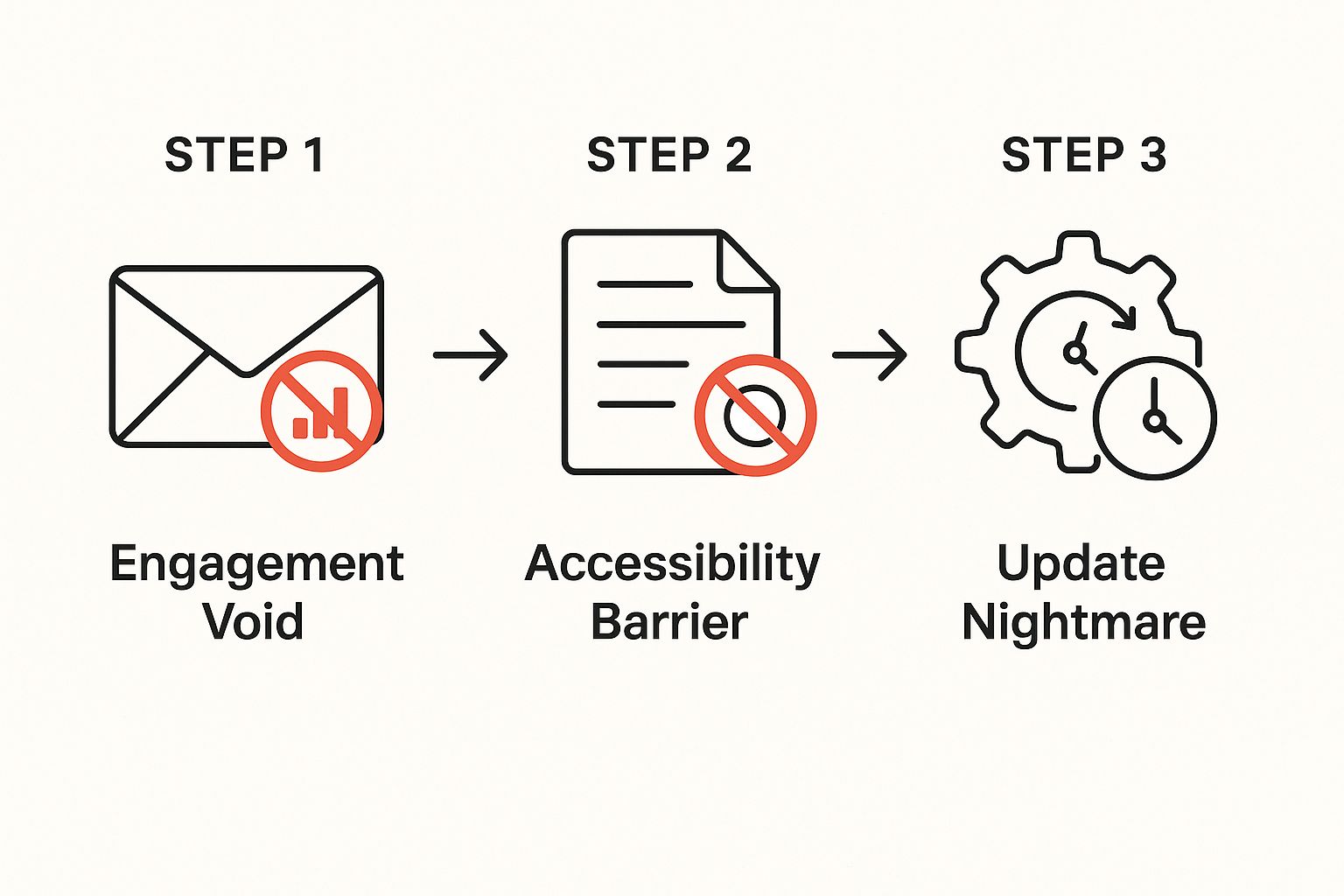
As you can see, the path is littered with silent rejections. From analytics black holes to technical roadblocks, your work faces an uphill battle before anyone even gives it a fair look.
The Accessibility Barrier
Then there's the file itself. Large, high-resolution PDFs can be a total headache for the person on the receiving end. They create a few common, but critical, problems:
- Email Server Limits: Many corporate email systems have strict attachment size limits, often capping out around 10MB to 25MB. A portfolio packed with high-quality images can easily blow past that. Your email might get bounced or flagged as spam, and you'll be none the wiser. I've had this happen to me, and it's incredibly frustrating.
- Mobile Incompatibility: Hiring managers are always on the go, often scrolling through applications on their phones between meetings. Trying to download, pinch, and zoom through a clunky PDF on a small screen is a frustrating experience that reflects poorly on your user-centric thinking.
While managing file sizes is a pain, there are some great expert tips to reduce PDF file size on Mac that can help. Even so, this only patches one part of the bigger accessibility problem.
The Interactivity Gap and Update Nightmare
Finally, a PDF flattens your dynamic, interactive work into lifeless screenshots. It’s a format that was never meant to showcase the smooth flow of a UX prototype, the slick timing of an animation, or the impact of a video. It reduces your most impressive, multi-dimensional projects to a single, static image.
And what happens when you finish a great new project? The "update nightmare" begins. You can’t just tack on a new page. You have to dig up the original design file, shuffle layouts, re-export the whole thing, and then try to remember all the places you need to send the new version. It's a tedious process that makes keeping your portfolio fresh feel like a chore.
How to Ditch Your PDF for a Dynamic Online Portfolio
Making the jump from a flat PDF portfolio to a living, breathing website can feel like a massive undertaking. I get it. But I promise it’s more straightforward than you think.
I’ve been there myself, and the trick is to see it less as starting from scratch and more like renovating a house. You already have the foundation and all the raw materials—your incredible work. You're just rebuilding it in a much, much better location.
Think of this as a mini-workshop focused on action. Let’s walk through the exact steps to take you from a single, static file to a powerful online presence. By the end, you'll have a clear roadmap to launch a portfolio that works for you around the clock.
Deconstruct Your PDF
First things first: you need to carefully dismantle your existing PDF. The mission here is to pull out all your valuable assets in the highest possible quality. You're looking for:
- High-Resolution Images: Export every single project image, mockup, and graphic. Don't just screenshot them; dive into your original design files to grab the crispest, cleanest versions you have.
- Text and Descriptions: Copy and paste all your project descriptions, case study details, and your professional bio into a separate document. This is also the perfect time to give everything a quick proofread and polish.
- Core Assets: Gather up any logos, brand elements, or other visuals that make up your professional identity.
This is your "demolition" phase. You're salvaging the best parts of the old structure before you start building the new one, making sure none of your hard work gets left behind.
Choose the Right Platform
With your assets neatly organized, it’s time to pick a new home for your work. This is a critical decision. The right portfolio builder can make all the difference, and studies show a clean user experience can boost visitor engagement by up to 200%.
Look for a platform that strikes a balance between simplicity and power. An intuitive drag-and-drop editor is a must-have—you want to spend your time showing off your work, not wrestling with code.
Here's a quick checklist of what to look for:
- Intuitive Design Tools: Can you easily upload your projects, switch up layouts, and tweak fonts without needing to watch hours of tutorials?
- Built-in Analytics: Does the platform show you who is visiting your site, which projects are getting the most attention, and where your traffic is coming from?
- Rich Content Support: Can you seamlessly embed things like videos, GIFs, and interactive prototypes from tools like Figma or InVision?
This screenshot shows the clean, modern interface of a tool like Fantastic Portfolios, which is designed to help you get a professional site live in minutes.
The platform is built for speed and impact, turning a simple upload process into a polished, structured online portfolio.
Build and Structure for Impact
Once you've picked your platform, you get to the fun part: actually building your new showcase. Start by creating individual pages or sections for your best projects. Upload those high-res images and paste in the project descriptions you polished earlier.
Don't just show the final piece; tell the story behind it. What problem were you trying to solve? What was your process? What were the results? This narrative is what turns a simple gallery into a compelling case study.
Organize your work logically. A smart structure is like a guided tour of your skills and accomplishments. Think about putting your strongest, most relevant project right at the top. You only have a few seconds to grab someone's attention, so make that first impression count. This kind of strategic organization is what separates a good portfolio from a great one that actually lands you the job.
Using Data to Perfect Your Portfolio
Okay, this is where things get really interesting for me. Moving from a static PDF portfolio to an online version gives you a superpower: data. Instead of just sending your work out into the void and crossing your fingers, you get a direct feedback loop. You’re no longer guessing what recruiters want to see; you're seeing it in the numbers.
Imagine this: you find out a hiring manager from your dream company just spent 80% of their time looking at your latest UX case study. That’s the kind of intel that lets you follow up with laser focus. This is the real magic of portfolio analytics—it turns your showcase from a simple gallery into a strategic career tool.
Understanding Key Metrics
Once your portfolio is online, you unlock a dashboard of incredibly valuable information. We’re not talking about vanity metrics here. This is about truly understanding your audience and what grabs their attention. You can finally start answering the questions every creative has obsessed over.
Here are the essential metrics you should be tracking:
- Page Views: Which specific projects are getting all the clicks? This tells you what’s drawing people in right from the get-go.
- Time on Page: Are visitors spending a solid three minutes digging into your process, or are they bouncing after ten seconds? High engagement means you’re telling a compelling story.
- Visitor Location: Seeing traffic pop up from cities where your target companies are based is a pretty strong signal of genuine interest.
This feedback loop is your secret weapon. It allows you to tweak your presentation, push your most popular work to the front, and walk into an interview already knowing what impressed them.
From Feedback to Action
Data is useless if you don't do anything with it. The real goal is to use these insights to constantly refine and improve your portfolio. I remember noticing one of my older projects was getting almost no attention. I swapped it out for a newer, more relevant case study, and my overall session duration jumped by 40% practically overnight.
Your portfolio should never be 'finished.' It's a living document that evolves with your skills and the feedback you receive. Data is what guides that evolution, ensuring you're always putting your best foot forward.
This analytical approach isn’t just for creatives; it’s becoming standard across all industries. Professionals are using data to make smarter decisions, whether they’re in finance or design. A recent industry survey, for example, found that 77% of wealth managers believe AI will help their firms offer a wider range of services, all fueled by data-driven insights. It's clear that understanding analytics is a major differentiator. You can read the full report on wealth management trends for 2025 to see just how critical data has become.
Ultimately, using data turns your portfolio from a static resume into an active, dynamic part of your career strategy. To see how this applies to other professional showcases, check out our guide on creating an effective business portfolio.
Real-World Wins: The Dynamic Portfolio Difference
Enough with the theory. The real proof is in the results, and I've seen firsthand how switching from a static PDF portfolio to a dynamic online version can completely change the game for creatives. These aren't just small improvements; we're talking about career-defining moments.
Take Jenna, a brand designer who kept sending her PDF into a black hole. She'd get nothing but silence and had no idea why. Once she moved her work online, her new analytics dashboard told a fascinating story.
We discovered recruiters were consistently clicking on one specific logo project, spending nearly 45% of their total visit time on that single page. It was a massive blinking sign pointing to what was truly hitting the mark.
Armed with that insight, Jenna rebuilt her portfolio around that star project, making it the undeniable centerpiece. What happened next? She landed three interviews the very next week, with all of them specifically mentioning how impressed they were with that project.
From Lifeless Images to Interactive Triumphs
Then there's Carlos, a UI/UX designer whose PDF portfolio was doing him a huge disservice. It could only display flat, lifeless screenshots of an app he had poured his heart into designing. The static images just couldn't convey the fluid, intuitive user experience he had crafted.
So for his new online portfolio, Carlos embedded an interactive prototype right on the project page. It was a game-changer. A hiring manager later told him they spent more than ten minutes just clicking through the demo. That one interactive element did what no static image ever could: it proved his skill and was the deciding factor in getting him the job offer.
These stories aren't exceptions; they show exactly how a dynamic portfolio creates real-world opportunities. To see how product designers can build a portfolio that drives these kinds of results, check out our in-depth guide on the essentials for a product designer's portfolio.
A Few Lingering Portfolio Questions
Switching gears from something as familiar as a PDF portfolio is bound to bring up some questions. I remember feeling the exact same way—wondering if I was making the right move by ditching a method I’d relied on for years. It's completely normal to have these thoughts, so let’s clear up the most common ones.
Should I Still Keep a PDF Portfolio At All?
The short answer is yes, but its job has totally changed. Think of it less as your opening act and more as a convenient "leave-behind."
A stripped-down, 3-5 page PDF version is perfect for sharing after an interview or for those rare moments someone specifically asks for one. But your main portfolio—the one you link in every application, email signature, and social bio—has to be the dynamic online version.
This gives you the best of both worlds. You can accommodate those old-school requests while making sure almost everyone sees your work in its best, most engaging light. If you need some ideas for that condensed PDF, these examples of a portfolio cover page can help you nail that first impression.
Seriously, Will Recruiters Even Look at an Online Portfolio?
Absolutely. In fact, most of them prefer it. I've seen it time and time again.
Recruiters are juggling dozens, if not hundreds, of candidates. An easy-to-navigate online portfolio is so much faster for them to scan than downloading and opening a clunky PDF. Remember, a 2018 study found that recruiters spend only about 7.4 seconds on an initial resume scan. A fast-loading link is a massive advantage, letting them see your work in an interactive format without any friction.
Okay, But How Do I Protect My Work Online?
This is a big one, and it's a valid concern. The good news is that modern platforms are built with security in mind.
Most good portfolio builders have built-in features like disabling right-click saving. You can also add subtle watermarks to your images and plaster a clear copyright notice across your site. For super-sensitive client projects, you can even put them on password-protected pages and only share the key with specific people. It gives you total control over who sees what.
Ready to finally make the switch from a static PDF to a dynamic online showcase? With Fantastic Portfolios, you can turn your resume or existing assets into a polished, professional website in minutes. Our AI-powered platform helps you build a site that not only looks incredible but also provides the analytics you need to land your next opportunity. Build your free portfolio today